
Download 3DP Net – ethernet driver update, automatic driver detection, driver rollback, free driver tool, network connectivity, Windows utility
Overview
3DP Net is a specialized Windows utility designed to simplify the often complex task of maintaining up-to-date ethernet card drivers. The app addresses a common pain point for users experiencing intermittent or degraded internet connectivity—outdated or incompatible network drivers. By automatically detecting the ethernet card model and fetching the latest drivers directly from the manufacturer’s official website, 3DP Net ensures users can maintain stable and high-performance network connections without technical expertise.
Targeted primarily at home users, remote workers, and IT administrators managing multiple devices, 3DP Net streamlines driver maintenance through automation and intuitive design. Its ability to identify hardware and verify driver versions eliminates the need for manual searches across manufacturer sites. Real-world use cases include resolving sudden loss of internet access after a Windows update, improving network stability in gaming or video conferencing, and restoring connectivity after hardware changes.
Developed by 3DP, a known name in the driver utility space, the app aligns with the broader ecosystem of system optimization tools. While specific developer background details were not provided, the app’s focus on reliability and direct manufacturer sourcing suggests a commitment to security and accuracy. For users seeking a no-frills, efficient solution to network driver issues, 3DP Net offers a focused and dependable tool.
Key Features & Functionality
- Automatic Driver Detection: The app scans the system to identify the exact model of the ethernet card, ensuring accurate driver matching. This eliminates guesswork and reduces the risk of installing incompatible drivers.
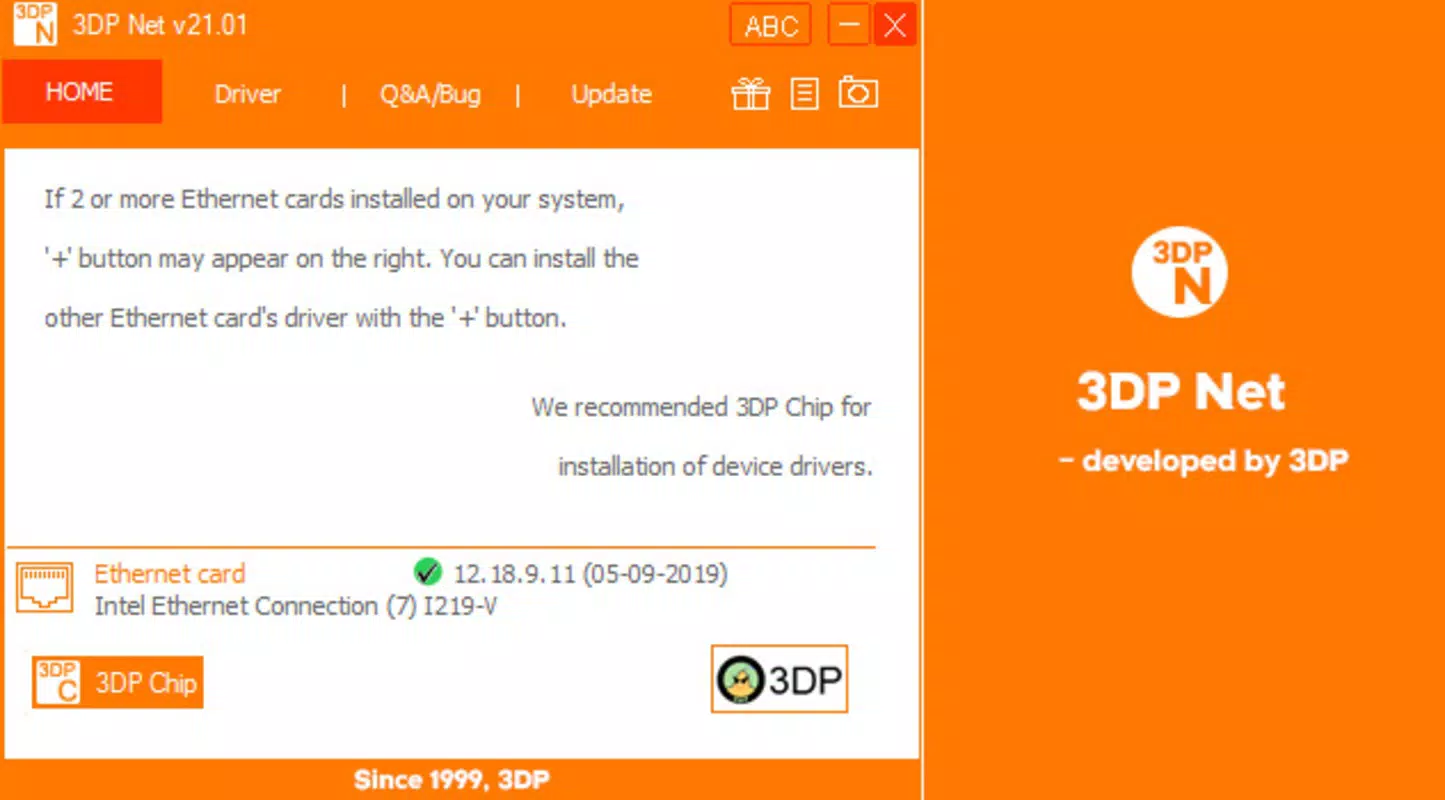
- User-Friendly Interface: The main tab displays critical information—card model, current driver version, and release date—using clear visual indicators (green check, yellow warning, red error). This immediate feedback allows users to quickly assess their driver status.
- One-Click Updates: When a newer driver version is available, users can update their ethernet drivers with a single click. This feature minimizes user effort and reduces the likelihood of errors during manual installation.
- Version Rollback Feature: Accessible via the Driver tab, this functionality allows users to revert to a previously stable driver version. This is particularly valuable when a new update introduces connectivity issues or instability.
- Free and Efficient: As a free tool, 3DP Net provides a cost-effective alternative to premium driver utilities. Its minimal file size of 1.2 MB ensures quick installation and low system resource usage.
For example, a user experiencing sudden internet drops after a Windows update can use 3DP Net to detect outdated drivers, verify the latest version, and apply the update instantly. Similarly, a remote worker encountering latency during video calls can restore a known stable driver version to resolve the issue swiftly.
Interface, UX & Performance
The interface of 3DP Net is clean, minimal, and purpose-driven. The layout centers around the main tab, where hardware and driver details are presented in a structured format. Navigation is straightforward, with clearly labeled sections and visual cues that enhance usability. The use of color-coded indicators (green, yellow, red) provides immediate feedback on driver health, supporting quick decision-making.
Although the developer did not list formal performance metrics, the app’s lightweight nature—1.2 MB in size—suggests efficient resource utilization. Users can expect minimal impact on system performance during scanning and updating processes. The application launches quickly and responds promptly to user inputs, indicating solid responsiveness.
Stability appears to be a design priority, particularly given the critical nature of network drivers. The ability to roll back changes safely suggests robust internal handling of driver installations. While real-world testing across various device categories was not detailed, the app’s targeted functionality and small footprint imply compatibility with a wide range of Windows systems, including older models.
Platform Compatibility & Technical Requirements
3DP Net is designed for the Windows platform and is compatible with Windows operating systems. The software version is 1.0.0, with a file size of 1.2 MB. The app is available at no cost, making it accessible to users across different technical skill levels.
The developer did not specify minimum OS requirements or compatibility details beyond the platform. As such, users should verify system compatibility with their current Windows version before installation. The app’s lightweight design suggests it may function on systems with limited resources, though this was not confirmed.
Pros and Cons
Pros
- Free to use with no hidden costs or subscriptions
- Automatic detection of ethernet card models enhances accuracy
- One-click driver updates simplify the maintenance process
- Safe rollback feature for restoring previous driver versions
- Minimal file size ensures quick download and installation
- Intuitive interface with clear visual indicators for driver status
Cons
- Specific OS compatibility details were not provided
- Developer background and support channels were not disclosed
- No built-in update notification system was mentioned
- Functionality is limited to ethernet drivers only
- No cloud sync or backup features for driver history
FAQ
Is 3DP Net safe to download and install?
Yes, 3DP Net is a free utility developed by 3DP and designed to retrieve drivers directly from manufacturer websites. The app does not contain malware or intrusive ads. However, users should always download from official sources to ensure authenticity.
Can I use 3DP Net on older Windows versions?
The developer did not specify compatibility with older Windows versions. While the lightweight design suggests potential compatibility, users should verify system requirements before installation.
Does 3DP Net update other types of drivers?
No, 3DP Net is specifically designed for ethernet card drivers. It does not support updates for graphics, audio, or other hardware drivers.
How often should I run 3DP Net to check for updates?
There is no built-in scheduling feature. Users should run the app manually when experiencing connectivity issues or after major Windows updates. For proactive maintenance, periodic checks every few months are recommended.
Can I roll back to a previous driver version if an update causes problems?
Yes, the app includes a dedicated rollback feature that allows users to restore a previously installed driver version. This is especially useful for resolving issues introduced by new driver updates.
Final Thoughts
3DP Net stands out as a focused, efficient, and reliable tool for users struggling with ethernet driver issues. Its automatic detection, one-click update capability, and rollback function address real-world connectivity challenges with minimal user effort. The app’s free status and small footprint make it an ideal choice for both casual users and technical professionals.
While the lack of detailed compatibility information and support channels may be a consideration, the app’s core functionality remains robust and trustworthy. For anyone seeking a secure, no-frills solution to maintain stable network performance on Windows, 3DP Net delivers tangible value.
Download 3DP Net now


